In one line
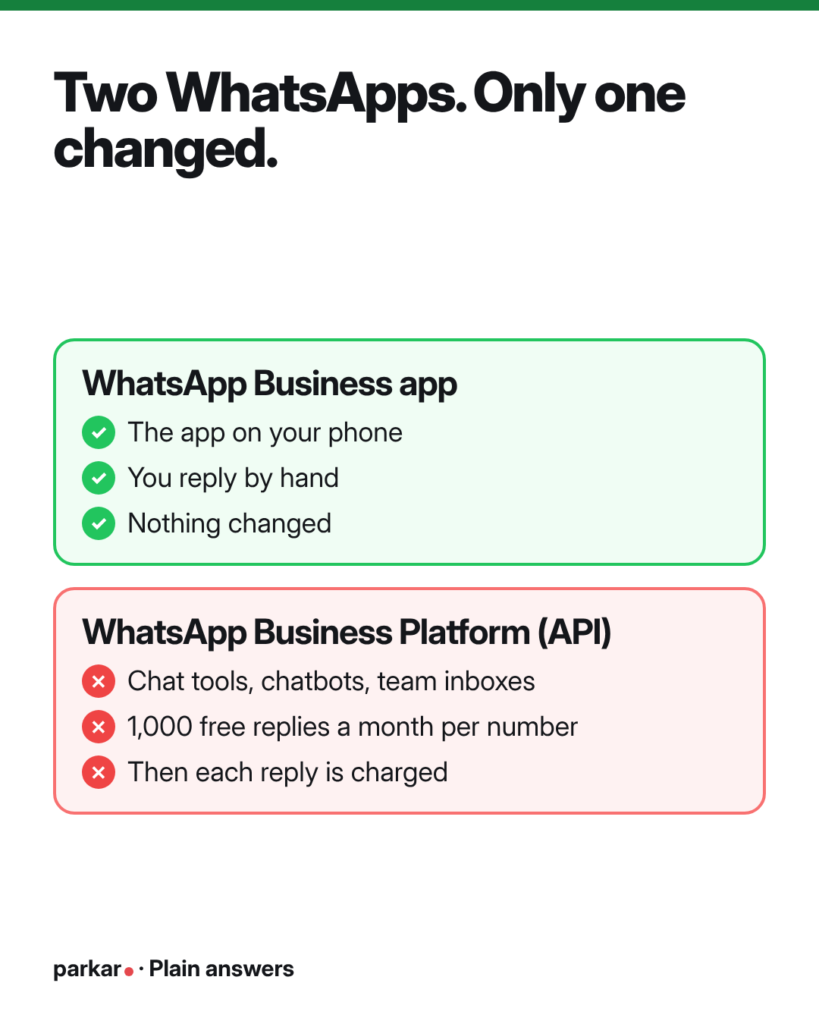
If you use the free WhatsApp Business app on your phone, nothing changed. If you use the WhatsApp Business Platform (the API, often through a chat tool or chatbot), your replies are now free only up to 1,000 a month per number.
Two different WhatsApps
This is the part most people mix up. There are two products with almost the same name.
The WhatsApp Business app. This is the green app you download on your phone. You type replies by hand. It is free to use.
The WhatsApp Business Platform. People also call it the WhatsApp API. It is how bigger systems plug into WhatsApp. If you use a shared team inbox, a chatbot, or a company that “connects” WhatsApp for you, you are almost surely on the Platform. Meta bills Platform users per message.
Think of it like a kitchen. The app is your home kitchen. You cook for free, but only you can cook. The Platform is a restaurant kitchen. Many cooks, machines and orders at once, but you pay for the gas.
The 1 October 2026 change is only about the restaurant kitchen. Provider guides and news reports agree on this. Meta’s own pricing page only talks about the Platform. One provider put it simply: nothing changes if you use the app on your phone and reply by hand.
What changed on 1 October 2026
Before this date, Platform replies were free. When a customer messaged you, a 24-hour “customer service window” opened. Anything you typed back in that window cost nothing.
Here is what Meta’s pricing page says now:
- Normal replies (“service messages”). Each business phone number gets 1,000 free delivered replies per month. After that, each reply is charged. Unused free replies don’t roll over to next month.
- Utility templates inside the window. These are pre-approved messages like order updates or booking reminders. They used to be free when sent inside the 24-hour window. Now they are charged from the very first one, with no free 1,000.
- Marketing and login-code templates. No change. These were already charged.
- Free entry point windows. Still free. These open when someone messages you from a Click-to-WhatsApp ad and you reply in time. More on that below.
Prices depend on the customer’s country, so we won’t quote one number. Check your provider’s rate card.
What to do
- Find out which WhatsApp you use. If you only use the app on a phone, you can stop worrying about this change. If a tool, agency or chatbot set up your WhatsApp, ask them: “Are we on the WhatsApp Business Platform?”
- Count your monthly replies. Ask your provider how many service messages each number sent last month. If you are well under 1,000, your bill may barely move.
- Say more in fewer messages. Five tiny messages count as five. One clear message with the price, the time and the next step counts as one. Save good answers as ready-made replies.
- Check your automatic messages. Chatbots love to send “Thanks!”, “One moment…”, “Anything else?” On the Platform, each can now count. Remove the ones nobody needs.
- Look at your utility templates. Booking confirmations and reminders now cost money even inside the window. Keep the ones that save you no-shows. Drop the ones that only say what the customer already knows.
- Don’t go silent to save money. A slow or missing reply loses far more than a message costs. Answering leads fast is still the job.
The hack
Use Click-to-WhatsApp ads to open free chats. These are Facebook or Instagram ads with a button that opens a WhatsApp chat with you.
Meta’s pricing page says when you reply to one of these chats inside the 24-hour window, a “free entry point” window opens. It can stay open for up to 7 days. Inside it, Meta does not charge for your messages, including templates. Some provider guides still say 72 hours, so check your own provider’s view.
The catch: you must reply within 24 hours of their first message. Miss that, and normal charges apply. So the cheapest reply is also the fastest one.
Try it yourself
Curious what slow replies cost you, compared with a few cents per message? Our free calculator shows the money you might lose each month.
Quick questions
Is WhatsApp Business no longer free?
The WhatsApp Business app on your phone is still free to use. The change is for the WhatsApp Business Platform, also called the API. That is the version used by chatbots, team inboxes and chat tools.
How do I know if I’m on the API?
If you reply only from the green app on one phone, you are on the app. If you log into a website or tool to reply, use a chatbot, or a company set it up for you, you are likely on the Platform. When in doubt, ask whoever set it up.
Is the 1,000 free messages per business or per number?
Per business phone number, per month. Meta’s page says each number gets its own free tier. If you have three numbers, each one gets its own 1,000.
Do I pay when customers message me?
No. The charges are for messages your business sends. Customers writing to you doesn’t cost you anything.
Are booking reminders charged now?
If you send them as utility templates on the Platform, yes. Since 1 October 2026 they are charged even inside the 24-hour window. The only exception is inside a free entry point window.
Should I move back to the free app?
Maybe, if you are small and one person handles chats. But the app has limits. It works best on one phone, and it has no proper team inbox or chatbot. Compare what you’d save with the time you’d lose.
Will prices change again?
They might. Meta has changed WhatsApp pricing several times. Check Meta’s pricing page or ask your provider every few months.
Want a hand?
Not sure which WhatsApp you are on, or where your messages go? Send us a message on WhatsApp. We’ll take a free look and tell you, in plain words, what this change means for you.
Where this comes from
Platforms change their rules often. We check these posts and update them when things change.